
Welcome to The Working Artist Learning Site › Forums › Feedback › General questions or comments on the platform
-
General questions or comments on the platform
Posted by Neil Hammond (TWA Team) on October 2, 2017 at 2:57 pmWelcome to the all-new The Working Artist platform.
We have woven together some pretty big pieces to make this platform.
Sometimes the parts slot together like a jigsaw, and other times it’s more like a sudoku puzzle… so we will always be looking to refine and add whatever we can to improve your experience.
In the spirit of creating this site as a community, we would welcome your feedback, insights and comments and also let us know if you spot any glitches, spellings, bad grammar etc!
Thank you
Neil + The Working Artist / Learnbase TeamKeona Hammond replied 7 years, 10 months ago 27 Members · 130 Replies -
130 Replies
-

I’m unable to see images inserted in Christas tutorials the screen goes black at points where there is an image inserted. I’m viewing this on an ipad with the safari browser can you help?
-

Thank you, I’ll get the code team to look into this. Could you let us know what version Ipad you have please.
-
-

Congratulations!!!
Just one little glitch so far – the circle for the facebook icon is empty ie logo not showing, unlike the instagram logo. Hope this makes sense.
Thank you and looking forward to enjoying the new site.
Jennifer
-
Hi Jennifer
The ones in the footer look ok, so you must be seeing this somewhere else, could you let me know where so we can fix.
Thanks
Neil-
Sorry Neil – I meant in my profile page – on top of the background, the social media links each appear in small circles https://learning.theworkingartist.com/members/artofjenniferharris/
I hope this is now clear.
Thank you!
Jennifer-
Hi – ok icons added now, and I added LinkedIn too as an option
-
Thank you Neil for fixing and Serge for doing the screenshot to clarify.
Jennifer
-
-
-

Same as Jennifer, Neil. Here is a screen shot;
…Ok, image link does not seem to work so here is the short link;
http://wp.me/aa7Xj-yz
-
-
So there is time frame for any editing on one’s post… Around 5 minutes?
English is not my first language and 5 minutes is a bit short but hey, you’ll get the picture. 😉-
Timeframe for editing a post is set (by default) at 5 minutes, but we can make it whatever we like. Should it be longer? Not sure what the balance between ability to edit and flow of conversation should be. Open to suggestions!
-
Thanks for asking Neil. I can only speak for myself, so as a preference 10-15 minutes is best. Usually it’s mostly punctuation and clarification (of course besides spelling) 😉
Anyhow, no big deal if you leave as is, it’s really up to you …
Regards
-
Ok – I’ve set it for 15, so let’s see how that goes. Thanks!
-
-
-
-
Hello again Neil
Another glitch re social in profiles – social icons at the top of a profile open to a new tab when clicked (yay); but there is a written section below summarising social etc and if you click on social links there it opens over the working artist, so you have to backspace to get back to the working artist. Hope you can see what I mean – refers to all profiles, not just mine.Thank you!
Jennifer-
Hi – it was not so much a glitch as the way it was designed in the social architecture there – but we found a good solution that overrides it and also fixes the same issue with links in forum posts in one go. Yay! Thank you!
Also, we made this editor here a little nicer!
By the way i was testing the instagram link in your profile and my 11 year old-boy happened to come in and see your Venetian glass vase painting and exclaimed ‘Wow! THAT is aMAZing’.
-
Thank you Neil! Glad to be part of the process and I will enjoy the nicer editor too. I did loops, but it is to be expected and you guys are fantastic in creating a supportive environment that has so many layers.
And please tell your son he has made my day, my birthday actually, the happiest ever.
Jennifer
-
Will do! He’ll be thrilled. Happy Birthday!
-
-
-
-

WOW so lovely!!!!!!! so impressed cant wait to get some time to really look. A spelling mistake on navigation page ‘shows’.
But I dont care really it is an absolute pleasure hope you guys are really proud-
Thank you! We’ll search and amend those typos asap!
-
-
Is it possible the “Notify me of follow-up replies via email” (below the comment box) does not work?
Again, not that important but I notice it did not let me know someone had reply to my posts etc.Note; all my email settings are checked marked to receive notifications and so is the one below in the comment box.
-
It should work, the way we have the settings set. And I am getting notifications for sure. We can look into it a little more this week.
Can you confirm that they are not going into your spam folder. Thanks!-
Sorry Neil, no notice in my spam folder either.
I did receive one the other day for a “New friendship request” so that works.
Anyone else having the issue?
-
Ok, thanks, this all helps to narrow things down. I know other people are getting them. One other thing to check is your email notification settings.
They should all be ‘on’ by default. See image in this screenshot: http://jmp.sh/bMlRwqk
-
-
-
-

hello,
This is an amazing platform, however, I am running into two glitches:
- on my profile, after my name, @majie appears automatically, and this is not my email address.
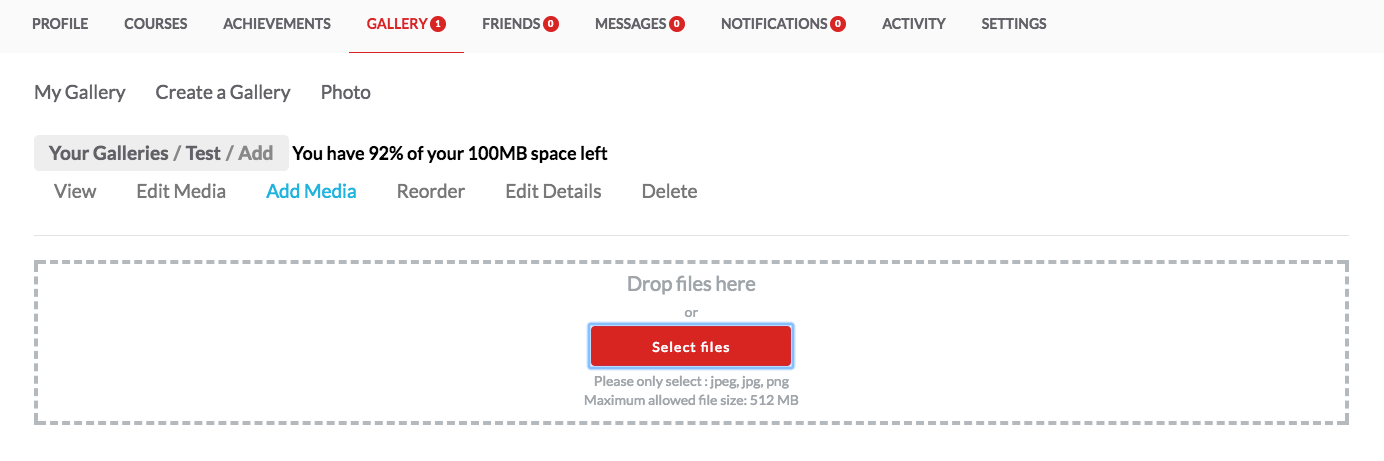
- when trying to create my own gallery, and when i click on photo, it goes nowhere, it doesn’t connect me to my Photos. I use an Apple desktop and a mini I pad.
thank you for looking into it,
Warmly
Majie
-
Hi Majie
1) So that wasn’t a glitch – the @majie is referencing your username not email.
However I don’t really see the point either – it’s probably just confusing and I and have hidden it from profile areas.Now I see point haha. It’s a way of linking to your profile from within a post. So for instance -‘check out @majie ‘
Not totally sure how useful this will be, but let’s keep it for now. Will unhide it.2) Once you have created a gallery you will be able to add media
-
Hi Neil,
Thank you for your emails.
Is there a way to place in my gallery a video or more. My work is interactive and it it best presented by showing in video form. If not is it possible to have links?
Warmly,
Majie
-
Technically we can have a video option but it is turned off. My worry is that we would have to increase everybody’s file size permissions so much if video were at play that we could put a strain on the server, and it’s a bit early days with this new site right now. And unfortunately i can only see option in this gallery piece we are using to upload videos not just add links which would make way more sense. Anyway I’ll let you know if i think of something or find something. Thanks.
-
-
Hi Neil,
Another question. In the gallery, is there aw ay to organize the paintings in the wanted order?
Warmly,
Majie
-
Yes – click on the gallery in you profile area that you want to reorder, click ‘edit’, then you’ll see a reorder option.
-
-
Hi Neil
I just went to the old TWA link at the top of this new site as wanted to look back at something but I get an error gateway page. Should I be using a different link?
Thanks
Sandra
-
Hi. It is working. Try adding cutting and pasting this link directly in your browser: https://archive.theworkingartist.com/
If you still can’t access please try clearing your browser cache (instructions here:)
-
-

Hi Neil,
I’ve just signed up for the Masterclass and am unable to save the PDF from The Working Artist Manifesto. I’ve tried on both Safari, and Chrome on my MacBook, and nothing happens when I click the “Save to PDF” button.
Thanks for your help!
Susan Havey
-
Hi – we noticed that too and have someone from our dev team on it this weekend, so if it is not fixed by Monday when the course starts it will be very soon after!
-
Hi – just to say our wonderful code lead completed the update so the pdf download for your notes is working now!
-
Thanks, Neil! I just saved my Working Artist Manifesto to PDF, and it worked beautifully! Thanks again! Susan Havey
-
-
Yes – sorry – the about the delete action, there is a button missing in the second step! We’ll fix this asap! Thanks
-
-

Hi Neil Hammond,
Do the different Galleries represent different Series?
Also I cannot delete mine,
Thanks,
Antonella from Coochie Mondi
-
Hi
Do the different Galleries represent different Series?
Possibly – you can use them however you wish !Also I cannot delete mine
Use the delete here (see screenshot) – i think there is another way that has a button missing which we will look into – but this way works:
-
Yes – sorry – the about the delete action, yes there is a button missing in the second step! We’ll fix this asap! Thanks
-
This is fixed now so you can delete galleries.
See:
-
-

Hi Neil;
I have just loaded 6 galleries but seems to have doubled up and the second has no images in it. I tried to delete but it will not. I have tried the directions you gave another artist. Also how do I rename my galleries after the fact. None of the edits allows for that.
Best Regards,
Anahata
-
This is fixed now so you can delete galleries.
See:
https://learning.theworkingartist.com/navigation-guide/#1506980282156-d488f758-9f13
-

Log in to reply.